Data Import Request Handler
Most applications store data in relational databases or XML files and searching over such data is a common use-case. The DataImportHandler is a Solr contrib that provides a configuration driven way to import this data into Solr in both "full builds" and using incremental delta imports.
Also see the DataImportHandlerFaq page. For simple usecases visit the DIHQuickStart
Overview
Goals
- Read data residing in relational databases
- Build Solr documents by aggregating data from multiple columns and tables according to configuration
- Update Solr with such documents
- Provide ability to do full imports according to configuration
- Detect inserts/update deltas (changes) and do delta imports (we assume a last-modified timestamp column for this to work)
- Schedule full imports and delta imports
- Read and Index data from xml/(http/file) based on configuration
- Make it possible to plugin any kind of datasource (ftp,scp etc) and any other format of user choice (JSON,csv etc)
Design Overview
The Handler has to be registered in the solrconfig.xml as follows.
  <requestHandler name="/dataimport" class="org.apache.solr.handler.dataimport.DataImportHandler">
    <lst name="defaults">
      <str name="config">/home/username/data-config.xml</str>
    </lst>
  </requestHandler>
As the name suggests, this is implemented as a SolrRequestHandler. The configuration is provided in two places:
- solrconfig.xml . The data config file location is added here
- The datasource also can be added here. Or it can be put directly into the data-config.xml
- data-config.xml
- How to fetch data (queries,url etc)
- What to read ( resultset columns, xml fields etc)
- How to process (modify/add/remove fields)
Usage with RDBMS
In order to use this handler, the following steps are required.
- Define a data-config.xml and specify the location this file in solrconfig.xml under DataImportHandler section
- Give connection information (if you choose to put the datasource information in solrconfig)
- Open the DataImportHandler page to verify if everything is in order http://localhost:8983/solr/dataimport
- Use full-import command to do a full import from the database and add to Solr index
- Use delta-import command to do a delta import (get new inserts/updates) and add to Solr index
Configuring DataSources
Add the tag 'dataSource' directly under the 'dataConfig' tag.
<dataSource type="JdbcDataSource" driver="com.mysql.jdbc.Driver" url="jdbc:mysql://localhost/dbname" user="db_username" password="db_password"/>
- The datasource configuration can also be done in solr config xml #solrconfigdatasource
- The attribute 'type' specifies the implementation class. It is optional. The default value is
'JdbcDataSource' - The attribute 'name' can be used if there are multiple datasources used by multiple entities
- All other attributes in the <dataSource> tag are specific to the particular dataSource implementation being configured.
- See here for plugging in your own
Oracle Example
You might need to download and install the Oracle JDBC Driver in the /lib directory of your Solr installation.
<dataSource name="jdbc" driver="oracle.jdbc.driver.OracleDriver" url="jdbc:oracle:thin:@//hostname:port/SID" user="db_username" password="db_password"/>
Multiple DataSources
It is possible to have more than one datasources for a configuration. To configure an extra datasource , just keep an another 'dataSource' tag . There is an implicit attribute "name" for a datasource. If there are more than one, each extra datasource must be identified by a unique name 'name="datasource-2"' .
eg:
<dataSource type="JdbcDataSource" name="ds-1" driver="com.mysql.jdbc.Driver" url="jdbc:mysql://db1-host/dbname" user="db_username" password="db_password"/>
<dataSource type="JdbcDataSource" name="ds-2" driver="com.mysql.jdbc.Driver" url="jdbc:mysql://db2-host/dbname" user="db_username" password="db_password"/>
in your entities:
..
<entity name="one" dataSource="ds-1" ...>
   ..
</entity>
<entity name="two" dataSource="ds-2" ...>
   ..
</entity>
..
Configuring JdbcDataSource
The attributes accepted by JdbcDataSource are ,
driver(required): The jdbc driver classnameurl(required) : The jdbc connection url (not required, if jndiName is used instead)user: User namepassword: The passwordjndiName: JNDI name of the preconfigured datasourcebatchSize: The batchsize used in jdbc connection. Use a value of '-1' in case of {{setFetchSize() }} exception.convertType:(true/false)Default is 'false' Automatically reads the data in the target Solr data-typeautoCommit: If set to 'false' it setssetAutoCommit(false) Solr1.4
readOnly: If this is set to 'true' , it setssetReadOnly(true),setAutoCommit(true),setTransactionIsolation(TRANSACTION_READ_UNCOMMITTED),setHoldability(CLOSE_CURSORS_AT_COMMIT)on the connection Solr1.4transactionIsolation: The possible values are [TRANSACTION_READ_UNCOMMITTED, TRANSACTION_READ_COMMITTED, TRANSACTION_REPEATABLE_READ,TRANSACTION_SERIALIZABLE,TRANSACTION_NONE] Solr1.4
Note: Any extra attributes put into the tag are directly passed on to the jdbc driver.
MySQL 5.1 Connector/J Specific Settings
batchSize: Always use a value of '-1'. Any other value may cause memory leaks.netTimeoutForStreamingResults: Set it explicitly to '0'. Default is '600' which means MySQL will disconnect your client connection after 10 minutes. You may see error message in logs, and you may wonder why your global setting 'net_write_timeout = 14400' does not work: "Application was streaming results when the connection failed. Consider raising value of 'net_write_timeout' on the server."
See MySQL 5.1 Driver/Datasource Class Names, URL Syntax and Configuration Properties for Connector/J.
Configuration in data-config.xml
A Solr document can be considered as a de-normalized schema having fields whose values come from multiple tables.
The data-config.xml starts by defining a document element. A document represents one kind of document. A document contains one or more root entities. A root entity can contain multiple sub-entities which in turn can contain other entities. An entity is a table/view in a relational database. Each entity can contain multiple fields. Each field corresponds to a column in the resultset returned by the query in the entity. For each field, mention the column name in the resultset. If the column name is different from the solr field name, then another attribute name should be given. Rest of the required attributes such as type will be inferred directly from the Solr schema.xml. (Can be overridden)
In order to get data from the database, our design philosophy revolves around 'templatized sql' entered by the user for each entity. This gives the user the entire power of SQL if he needs it. The root entity is the central table whose columns can be used to join this table with other child entities.
Schema for the data config
- The dataconfig does not have a rigid schema. The attributes in the entity/field are arbitrary and depends on the
processorandtransformer.
The default attributes for an entity are:
name(required) : A unique name used to identify an entityprocessor: Required only if the datasource is not RDBMS . (The default value isSqlEntityProcessor)transformer: Transformers to be applied on this entity. (See the transformer section)dataSource: The name of a datasource as put in the the datasource .(Used if there are multiple datasources)threads: The no:of of threads to use to run this entity. This must be placed on or above a 'rootEntity'. Solr3.1- Warning: Not all combinations of DIH components can be used safely with 'threads'. If using this feature, be sure to test thoroughly!
- Significant bugs related to 'threads' are fixed with SOLR-3011]. If using this feature with an older version, upgrading is recommended. See [https://issues.apache.org/jira/browse/SOLR-3011 With Solr 3.6.0, you should also apply the fix from SOLR-3360.
- The 'threads' parameter is Deprecated as of SOLR-3262] and is slated for removal in Solr4.0. [https://issues.apache.org/jira/browse/SOLR-3262
pk: The primary key for the entity. It is optional and only needed when using delta-imports. It has no relation to the uniqueKey defined in schema.xml but they both can be the same.rootEntity: By default the entities falling under the document are root entities. If it is set to false , the entity directly falling under that entity will be treated as the root entity (so on and so forth). For every row returned by the root entity a document is created in SolronError: (abort|skip|continue) . The default value is 'abort' . 'skip' skips the current document. 'continue' continues as if the error did not happen . Solr1.4preImportDeleteQuery: before full-import this will be used to cleanup the index instead of using '*:*' .This is honored only on an entity that is an immediate sub-child of <document> Solr1.4.postImportDeleteQuery: after full-import this will be used to cleanup the index <!>. This is honored only on an entity that is an immediate sub-child of <document> Solr1.4.
For SqlEntityProcessor the entity attributes are :
query(required) : The sql string using which to query the dbdeltaQuery: Only used in delta-importparentDeltaQuery: Only used in delta-importdeletedPkQuery: Only used in delta-importdeltaImportQuery: (Only used in delta-import) . If this is not present , DIH tries to construct the import query by(after identifying the delta) modifying the 'query' (this is error prone). There is a namespace${dih.delta.<column-name>} which can be used in this query. e.g:select * from tbl where id=${dih.delta.id} Solr1.4.
Commands
The handler exposes all its API as http requests . The following are the possible operations
- full-import : Full Import operation can be started by hitting the URL
http://<host>:<port>/solr/dataimport?command=full-import- This operation will be started in a new thread and the status attribute in the response should be shown busy now.
- The operation may take some time depending on size of dataset.
- When full-import command is executed, it stores the start time of the operation in a file located at conf/dataimport.properties (this file is configurable)
- This stored timestamp is used when a delta-import operation is executed.
- Queries to Solr are not blocked during full-imports.
- It takes in extra parameters:
- entity : Name of an entity directly under the <document> tag. Use this to execute one or more entities selectively. Multiple 'entity' parameters can be passed on to run multiple entities at once. If nothing is passed, all entities are executed.
- clean : (default 'true'). Tells whether to clean up the index before the indexing is started.
- commit : (default 'true'). Tells whether to commit after the operation.
- optimize : (default 'true' up to Solr 3.6, 'false' afterwards). Tells whether to optimize after the operation. Please note: this can be a very expensive operation and usually does not make sense for delta-imports.
- debug : (default 'false'). Runs in debug mode. It is used by the interactive development mode (see here).
- Please note that in debug mode, documents are never committed automatically. If you want to run debug mode and commit the results too, add 'commit=true' as a request parameter.
- delta-import : For incremental imports and change detection run the command
http://<host>:<port>/solr/dataimport?command=delta-import. It supports the same clean, commit, optimize and debug parameters as full-import command. - status : To know the status of the current command, hit the URL
http://<host>:<port>/solr/dataimport. It gives an elaborate statistics on no. of docs created, deleted, queries run, rows fetched, status etc. - reload-config : If the data-config is changed and you wish to reload the file without restarting Solr. Run the command
http://<host>:<port>/solr/dataimport?command=reload-config. - abort : Abort an ongoing operation by hitting the URL
http://<host>:<port>/solr/dataimport?command=abort.
Full Import Example
Let us consider an example. Suppose we have the following schema in our database
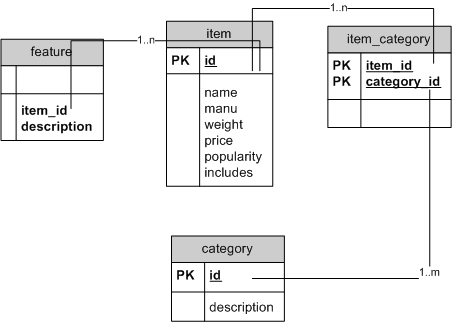
This is a relational model of the same schema that Solr currently ships with. We will use this as an example to build a data-config.xml for DataImportHandler. We've created a sample database with this schema using HSQLDB. To run it, do the following steps:
- Look at the example/example-DIH directory in the solr download. It contains a complete solr home with all the configuration you need to execute this as well as the RSS example (given later in this page).
- Use the example-DIH/solr directory as your solr home. Start Solr by running from the root
/examplesdirectory:java -Dsolr.solr.home="./example-DIH/solr/" -jar start.jar - Hit http://localhost:8983/solr/db/dataimport with a browser to verify the configuration.
- Hit http://localhost:8983/solr/db/dataimport?command=full-import to do a full import.
The solr directory is a MultiCore Solr home. It has two cores, one for the DB example (this one) and one for an RSS example (new feature).
- The data-config.xml used for this example is:
<dataConfig>
<dataSource driver="org.hsqldb.jdbcDriver" url="jdbc:hsqldb:/temp/example/ex" user="sa" />
    <document name="products">
        <entity name="item" query="select * from item">
            <field column="ID" name="id" />
            <field column="NAME" name="name" />
            <field column="MANU" name="manu" />
            <field column="WEIGHT" name="weight" />
            <field column="PRICE" name="price" />
            <field column="POPULARITY" name="popularity" />
            <field column="INSTOCK" name="inStock" />
            <field column="INCLUDES" name="includes" />

            <entity name="feature" query="select description from feature where item_id='${item.ID}'">
                <field name="features" column="description" />
            </entity>
            <entity name="item_category" query="select CATEGORY_ID from item_category where item_id='${item.ID}'">
                <entity name="category" query="select description from category where id = '${item_category.CATEGORY_ID}'">
                    <field column="description" name="cat" />
                </entity>
            </entity>
        </entity>
    </document>
</dataConfig>
Here, the root entity is a table called "item" whose primary key is a column "id". Data can be read from this table with the query "select * from item". Each item can have multiple "features" which are in the table feature inside the column description. Note the query in feature entity:
   <entity name="feature" query="select description from feature where item_id='${item.id}'">
       <field name="feature" column="description" />
   </entity>
The item_id foreign key in feature table is joined together with id primary key in item to retrieve rows for each row in item. In a similar fashion, we join item and 'category' (which is a many-to-many relationship). Notice how we join these two tables using the intermediate table item_category again using templated SQL.
 <entity name="item_category" query="select category_id from item_category where item_id='${item.id}'">
                <entity name="category" query="select description from category where id = '${item_category.category_id}'">
                    <field column="description" name="cat" />
                </entity>
            </entity>
A shorter data-config
In the above example, there are mappings of fields to Solr fields. It is possible to totally avoid the field entries in entities if the names of the fields are same (case does not matter) as those in Solr schema. You may need to add a field entry if any of the built-in Tranformers are used (see Transformer section)
The shorter version is given below
<dataConfig>
    <dataSource driver="org.hsqldb.jdbcDriver" url="jdbc:hsqldb:/temp/example/ex" user="sa" />
    <document>
        <entity name="item" query="select * from item">
            <entity name="feature" query="select description as features from feature where item_id='${item.ID}'"/>
            <entity name="item_category" query="select CATEGORY_ID from item_category where item_id='${item.ID}'">
                <entity name="category" query="select description as cat from category where id = '${item_category.CATEGORY_ID}'"/>
            </entity>
        </entity>
    </document>
</dataConfig>
Using delta-import command
Delta Import operation can be started by hitting the URL http://localhost:8983/solr/dataimport?command=delta-import. This operation will be started in a new thread and the status attribute in the response should be shown busy now. Depending on the size of your data set, this operation may take some time. At any time, you can hit http://localhost:8983/solr/dataimport to see the status flag.
When delta-import command is executed, it reads the start time stored in conf/dataimport.properties. It uses that timestamp to run delta queries and after completion, updates the timestamp in conf/dataimport.properties.
Note: there is an alternative approach for updating documents in Solr, which is in many cases more efficient and also requires less configuration explained on DataImportHandlerDeltaQueryViaFullImport.
Delta-Import Example
We will use the same example database used in the full import example. Note that the database schema has been updated and each table contains an additional column last_modified of timestamp type. You may want to download the database again since it has been updated recently. We use this timestamp field to determine what rows in each table have changed since the last indexed time.
Take a look at the following data-config.xml
<dataConfig>
<dataSource driver="org.hsqldb.jdbcDriver" url="jdbc:hsqldb:/temp/example/ex" user="sa" />
<document name="products">
<entity name="item" pk="ID"
query="select * from item"
deltaImportQuery="select * from item where ID='${dih.delta.id}'"
deltaQuery="select id from item where last_modified > '${dih.last_index_time}'">
<entity name="feature" pk="ITEM_ID"
query="select description as features from feature where item_id='${item.ID}'">
</entity>
<entity name="item_category" pk="ITEM_ID, CATEGORY_ID"
query="select CATEGORY_ID from item_category where ITEM_ID='${item.ID}'">
<entity name="category" pk="ID"
query="select description as cat from category where id = '${item_category.CATEGORY_ID}'">
</entity>
</entity>
</entity>
</document>
</dataConfig>
Pay attention to the deltaQuery attribute which has an SQL statement capable of detecting changes in the item table. Note the variable ${dataimporter.last_index_time} The DataImportHandler exposes a variable called last_index_time which is a timestamp value denoting the last time full-import 'or' delta-import was run. You can use this variable anywhere in the SQL you write in data-config.xml and it will be replaced by the value during processing.
Note
- The deltaQuery in the above example only detects changes in item but not in other tables. You can detect the changes to all child tables in one SQL query as specified below. Figuring out it's details is an exercise for the user

        deltaQuery="select id from item where id in
                                (select item_id as id from feature where last_modified > '${dih.last_index_time}')
                                or id in
                                (select item_id as id from item_category where item_id in
                                    (select id as item_id from category where last_modified > '${dih.last_index_time}')
                                or last_modified > '${dih.last_index_time}')
                                or last_modified > '${dih.last_index_time}'"
- Writing a huge deltaQuery like the above one is not a very enjoyable task, so we have an alternate mechanism of achieving this goal.
<dataConfig>
<dataSource driver="org.hsqldb.jdbcDriver" url="jdbc:hsqldb:/temp/example/ex" user="sa" />
<document>
<entity name="item" pk="ID" query="select * from item"
deltaImportQuery="select * from item where ID=='${dih.delta.id}'"
deltaQuery="select id from item where last_modified > '${dih.last_index_time}'">
<entity name="feature" pk="ITEM_ID"
query="select DESCRIPTION as features from FEATURE where ITEM_ID='${item.ID}'"
deltaQuery="select ITEM_ID from FEATURE where last_modified > '${dih.last_index_time}'"
parentDeltaQuery="select ID from item where ID=${feature.ITEM_ID}"/>
<entity name="item_category" pk="ITEM_ID, CATEGORY_ID"
query="select CATEGORY_ID from item_category where ITEM_ID='${item.ID}'"
deltaQuery="select ITEM_ID, CATEGORY_ID from item_category where last_modified > '${dih.last_index_time}'"
parentDeltaQuery="select ID from item where ID=${item_category.ITEM_ID}">
<entity name="category" pk="ID"
query="select DESCRIPTION as cat from category where ID = '${item_category.CATEGORY_ID}'"
deltaQuery="select ID from category where last_modified > '${dih.last_index_time}'"
parentDeltaQuery="select ITEM_ID, CATEGORY_ID from item_category where CATEGORY_ID=${category.ID}"/>
</entity>
</entity>
</document>
</dataConfig>
Here we have three queries specified for each entity except the root (which has only two).
- The query gives the data needed to populate fields of the Solr document in full-import
- The deltaImportQuery gives the data needed to populate fields when running a delta-import
- The deltaQuery gives the primary keys of the current entity which have changes since the last index time
- The parentDeltaQuery uses the changed rows of the current table (fetched with deltaQuery) to give the changed rows in the parent table. This is necessary because whenever a row in the child table changes, we need to re-generate the document which has that field.
Let us reiterate on the findings:
- For each row given by query, the query of the child entity is executed once.
- For each row given by deltaQuery, the parentDeltaQuery is executed.
- If any row in the root/child entity changes, we regenerate the complete Solr document which contained that row.
Note : The 'deltaImportQuery' is a Solr 1.4 feature. Originally it was generated automatically using the 'query' attribute which is error prone. Note : It is possible to do delta-import using a full-import command . See here
Solr3.1 The handler checks to make sure that your declared primary key field is in the results of all queries. In one instance, this required using an SQL alias when upgrading from 1.4 to 3.1, with a primary key field of "did":
deltaQuery="SELECT MAX(did) FROM ${dataimporter.request.dataView}"- Changed to:
deltaQuery="SELECT MAX(did) AS did FROM ${dataimporter.request.dataView}"
- Changed to:
Configuring The Property Writer
Solr4.1 Add the tag 'propertyWriter' directly under the 'dataConfig' tag. The property "last_index_time" is converted to text and stored in the properties file and is available for the next import as the variable '${dih.last_index_time}' . This tag gives control over how this properties file is written.
<propertyWriter dateFormat="yyyy-MM-dd HH:mm:ss" type="SimplePropertiesWriter" directory="data" filename="my_dih.properties" locale="en_US" />
- This tag is optional, resulting in the default locale,directory and filename. The 'type' will default to SimplePropertiesWriter for non-SolrCloud installations. For SolrCloud, ZKPropertiesWriter is default.
- 'type' - the implementation class. This is required unless <propertyWriter /> is omitted entirely.
- 'filename' - (SimplePropertiesWriter) The default is the name of the request handler followed by ".properties", for instance, dataimport.properties
- 'directory' -(SimplePropertiesWriter) The default is "conf".
- 'dateFormat' - (SimplePropertiesWriter/ZKPropertiesWriter) Specify a java.text.SimpleDateFormat pattern to use when converting the date to text. The default is yyyy-MM-dd HH:mm:ss . For JDBC escape syntax, use {'ts' yyyy-MM-dd HH:mm:ss} .
- 'locale' - (SimplePropertiesWriter/ZKPropertiesWriter) In Solr 4.1, The default locale is the ROOT Locale. This differs from Solr 4.0 and prior, which always used the machine's default locale.
Usage with XML/HTTP Datasource
DataImportHandler can be used to index data from HTTP based data sources. This includes using indexing from REST/XML APIs as well as from RSS/ATOM Feeds.
Configuration of URLDataSource or HttpDataSource
HttpDataSource is being deprecated in favour of URLDataSource in Solr1.4
Sample configurations for URLDataSource Solr1.4 and HttpDataSource in data config xml look like this
<dataSource name="b" type="!HttpDataSource" baseUrl="http://host:port/" encoding="UTF-8" connectionTimeout="5000" readTimeout="10000"/>
<!-- or in Solr 1.4-->
<dataSource name="a" type="URLDataSource" baseUrl="http://host:port/" encoding="UTF-8" connectionTimeout="5000" readTimeout="10000"/>
- The extra attributes specific to this datasource are*
baseUrl(optional): you should use it when the host/port changes between Dev/QA/Prod environments. Using this attribute isolates the changes to be made to the solrconfig.xmlencoding(optional): By default the encoding in the response header is used. You can use this property to override the default encoding.connectionTimeout(optional):The default value is 5000msreadTimeout(optional): the default value is 10000ms
Configuration in data-config.xml
The entity for an xml/http data source can have the following attributes over and above the default attributes
processor(required) : The value must be"XPathEntityProcessor"url(required) : The url used to invoke the REST API. (Can be templatized). if the data souce is file this must be the file locationstream(optional) : set this to true , if the xml is really bigforEach(required) : The xpath expression which demarcates a record. If there are multiple types of record separate them with " | " (pipe) . If useSolrAddSchema is set to 'true' this can be omitted.xsl(optional): This will be used as a preprocessor for applying the XSL transformation. Provide the full path in the filesystem or a url.useSolrAddSchema(optional): Set it's value to 'true' if the xml that is fed into this processor has the same schema as that of the solr add xml. No need to mention any fields if it is set to true.flatten(optional) : If this is set to true, text from under all the tags are extracted into one field , irrespective of the tag name. Solr1.4
The entity fields can have the following attributes (over and above the default attributes):
xpath(optional) : The xpath expression of the field to be mapped as a column in the record . It can be omitted if the column does not come from an xml attribute (is a synthetic field created by a transformer). If a field is marked as multivalued in the schema and in a given row of the xpath finds multiple values it is handled automatically by the XPathEntityProcessor. No extra configuration is requiredcommonField: can be (true| false) . If true, this field once encountered in a record will be copied to other records before creating a Solr document
If an API supports chunking (when the dataset is too large) multiple calls need to be made to complete the process. XPathEntityprocessor supports this with a transformer. If transformer returns a row which contains a field $hasMore with a the value "true" the Processor makes another request with the same url template (The actual value is recomputed before invoking ). A transformer can pass a totally new url too for the next call by returning a row which contains a field $nextUrl whose value must be the complete url for the next call.
The XPathEntityProcessor implements a streaming parser which supports a subset of xpath syntax. Complete xpath syntax is not supported but most of the common use cases are covered as follows:-
   xpath="/a/b/subject[@qualifier='fullTitle']"
   xpath="/a/b/subject/@qualifier"
   xpath="/a/b/c"
   xpath="//a/..."
   xpath="/a//b..."
HttpDataSource Example
HttpDataSource is being deprecated in favour of URLDataSource in Solr1.4
Download the full import example given in the DB section to try this out. We'll try indexing the Slashdot RSS feed for this example.
The data-config for this example looks like this:
<dataConfig>
        <dataSource type="HttpDataSource" />
        <document>
                <entity name="slashdot"
                        pk="link"
                        url="http://rss.slashdot.org/Slashdot/slashdot"
                        processor="XPathEntityProcessor"
                        forEach="/RDF/channel | /RDF/item"
                        transformer="DateFormatTransformer">

                        <field column="source"       xpath="/RDF/channel/title"   commonField="true" />
                        <field column="source-link"  xpath="/RDF/channel/link"    commonField="true" />
                        <field column="subject"      xpath="/RDF/channel/subject" commonField="true" />

                        <field column="title"        xpath="/RDF/item/title" />
                        <field column="link"         xpath="/RDF/item/link" />
                        <field column="description"  xpath="/RDF/item/description" />
                        <field column="creator"      xpath="/RDF/item/creator" />
                        <field column="item-subject" xpath="/RDF/item/subject" />

                        <field column="slash-department" xpath="/RDF/item/department" />
                        <field column="slash-section"    xpath="/RDF/item/section" />
                        <field column="slash-comments"   xpath="/RDF/item/comments" />
                        <field column="date" xpath="/RDF/item/date" dateTimeFormat="yyyy-MM-dd'T'hh:mm:ss" />
                </entity>
        </document>
</dataConfig>
This data-config is where the action is. If you read the structure of the Slashdot RSS, it has a few header elements such as title, link and subject. Those are mapped to the Solr fields source, source-link and subject respectively using xpath syntax. The feed also has multiple item elements which contain the actual news items. So, what we wish to do is , create a document in Solr for each 'item'.
The XPathEntityprocessor is designed to stream the xml, row by row (Think of a row as various fields in a xml element ). It uses the forEach attribute to identify a 'row'. In this example forEach has the value '/RDF/channel | /RDF/item' . This says that this xml has two types of rows (This uses the xpath syntax for OR and there can be more than one type of rows) . After it encounters a row , it tries to read as many fields are there in the field declarations. So in this case, when it reads the row '/RDF/channel' it may get 3 fields 'source', 'source-link' , 'source-subject' . After it processes the row it realizes that it does not have any value for the 'pk' field so it does not try to create a Solr document for this row (Even if it tries it may fail in solr). But all these 3 fields are marked as commonField="true" . So it keeps the values handy for subsequent rows.
It moves ahead and encounters /RDF/item and processes the rows one by one . It gets the values for all the fields except for the 3 fields in the header. But as they were marked as common fields, the processor puts those fields into the record just before creating the document.
What about this transformer=DateFormatTransformer attribute in the entity? . See DateFormatTransformer Section for details
You can use this feature for indexing from REST API's such as rss/atom feeds, XML data feeds , other Solr servers or even well formed xhtml documents . Our XPath support has its limitations (no wildcards , only fullpath etc) but we have tried to make sure that common use-cases are covered and since it's based on a streaming parser, it is extremely fast and consumes constant amount of memory even for large XMLs. It does not support namespaces , but it can handle xmls with namespaces . When you provide the xpath, just drop the namespace and give the rest (eg if the tag is '<dc:subject>' the mapping should just contain 'subject').Easy, isn't it? And you didn't need to write one line of code! Enjoy
Note : Unlike with database , it is not possible to omit the field declarations if you are using XPathEntityProcessor. It relies on the xpaths declared in the fields to identify what to extract from the xml.
Example: Indexing wikipedia
The following data-config.xml was used to index a full (en-articles, recent only) wikipedia dump. The file downloaded from wikipedia was the pages-articles.xml.bz2 which when uncompressed is around 40GB on disk.
<dataConfig>
        <dataSource type="FileDataSource" encoding="UTF-8" />
        <document>
        <entity name="page"
                processor="XPathEntityProcessor"
                stream="true"
                forEach="/mediawiki/page/"
                url="/data/enwiki-20130102-pages-articles.xml"
                transformer="RegexTransformer,DateFormatTransformer"
                >
            <field column="id"        xpath="/mediawiki/page/id" />
            <field column="title"     xpath="/mediawiki/page/title" />
            <field column="revision"  xpath="/mediawiki/page/revision/id" />
            <field column="user"      xpath="/mediawiki/page/revision/contributor/username" />
            <field column="userId"    xpath="/mediawiki/page/revision/contributor/id" />
            <field column="text"      xpath="/mediawiki/page/revision/text" />
            <field column="timestamp" xpath="/mediawiki/page/revision/timestamp" dateTimeFormat="yyyy-MM-dd'T'hh:mm:ss'Z'" />
            <field column="$skipDoc"  regex="^#REDIRECT .*" replaceWith="true" sourceColName="text"/>
       </entity>
        </document>
</dataConfig>
The relevant portion of schema.xml is below:
<field name="id"        type="string"  indexed="true" stored="true" required="true"/>
<field name="title"     type="string"  indexed="true" stored="false"/>
<field name="revision"  type="int"    indexed="true" stored="true"/>
<field name="user"      type="string"  indexed="true" stored="true"/>
<field name="userId"    type="int"     indexed="true" stored="true"/>
<field name="text"      type="text_en"    indexed="true" stored="false"/>
<field name="timestamp" type="date"    indexed="true" stored="true"/>
<field name="titleText" type="text_en"    indexed="true" stored="true"/>
...
<uniqueKey>id</uniqueKey>
<copyField source="title" dest="titleText"/>
Time taken was around 50 minutes to index 8,338,182 articles with peak memory usage at around 4GB. This test was done with Solr 4.3.1 release with ramBufferSizeMB set to 256MB. The wikipedia dump was on a Seagate 7200rpm HDD and the Solr index on a Corsair Force GT Solid State Disk.
Note that many wikipedia articles are merely redirects to other articles, the use of $skipDoc Solr1.4 allows those articles to be ignored. Also, the column $skipDoc is only defined when the regexp matches.
Using delta-import command
The only EntityProcessor which supports delta is SqlEntityProcessor! The XPathEntityProcessor has not implemented it yet. So, unfortunately, there is no delta support for XML at this time. If you want to implement those methods in XPathEntityProcessor: The methods are explained in EntityProcessor.java.
Indexing Emails
Tika Integration
Extending the tool with APIs
The examples we explored are admittedly, trivial . It is not possible to have all user needs met by an xml configuration alone. So we expose a few abstract class which can be implemented by the user to enhance the functionality.
Transformer
Every set of fields fetched by the entity can be either consumed directly by the indexing process or they can be massaged using transformers to modify a field or create a totally new set of fields, it can even return more than one row of data. The transformers must be configured on an entity level as follows.
<entity name="foo" transformer="com.foo.Foo" ... />
Note – The transformer value has to be fully qualified classname .If the class package is 'org.apache.solr.handler.dataimport' the package name can be omitted. The solr.<classname> also works if the class belongs to one of the 'solr' packages . This rule applies for all the pluggable classes like DataSource , EntityProcessor and Evaluator.
the class 'Foo' must extend the abstract class org.apache.solr.hander.dataimport.Transformer The class has only one abstract method.
The entity transformer attribute can consist of a comma separated list of transformers (say transformer="foo.X,foo.Y"). The transformers are chained in this case and they are applied one after the other in the order in which they are specified. What this means is that after the fields are fetched from the datasource, the list of entity columns are processed one at a time in the order listed inside the entity tag and scanned by the first transformer to see if any of that transformers attributes are present. If so the transformer does it's thing! When all of the listed entity columns have been scanned the process is repeated using the next transformer in the list.
A transformer can be used to alter the value of a field fetched from the datasource or to populate an undefined field. If the action of the transformer fails, say a regex fails to match, then an existing field will be unaltered and an undefined field will remain undefined. The chaining effect described above allows a column's value to be altered again and again by successive transformers. A transformer may make use of other entity fields in the course of massaging a columns value.
RegexTransformer
There is an built-in transformer called 'RegexTransformer' provided with DIH. It helps in extracting or manipulating values from fields (from the source) using Regular Expressions. The actual class name is org.apache.solr.handler.dataimport.RegexTransformer. But as it belongs to the default package the package-name can be omitted.
Attributes
RegexTransformer is only activated for fields with an attribute of 'regex' or 'splitBy'. Other fields are ignored.
regex: The regular expression that is used to match against the column or sourceColName's value(s). IfreplaceWithis absent, each regex group is taken as a value and a list of values is returnedsourceColName: The column on which the regex is to be applied. If this is absent source and target are samesplitBy: Used to split a String to obtain multiple values, returns a list of valuesgroupNames: A comma separated list of field column names, used where theregexcontains groups and each group is to be saved to a different field. If some groups are not to be named leave a space between commas. Solr1.4replaceWith: Used along withregex. It is equivalent to the methodnew String(<sourceColVal>).replaceAll(<regex>, <replaceWith>)
example:
<entity name="foo" transformer="RegexTransformer"
query="select full_name , emailids from foo"/>
... />
   <field column="full_name"/>
   <field column="firstName" regex="Mr(\w*)\b.*" sourceColName="full_name"/>
   <field column="lastName" regex="Mr.*?\b(\w*)" sourceColName="full_name"/>

   <!-- another way of doing the same -->
   <field column="fullName" regex="Mr(\w*)\b(.*)" groupNames="firstName,lastName"/>
   <field column="mailId" splitBy="," sourceColName="emailids"/>
</entity>
In this example the attributes 'regex' and 'sourceColName' are custom attributes used by the transformer. It reads the field 'full_name' from the resultset and transforms it to two new target fields 'firstName' and 'lastName'. So even though the query returned only one column 'full_name' in the resultset the solr document gets two extra fields 'firstName' and 'lastName' which are 'derived' fields. These new fields are only created if the regexp matches.
The 'emailids' field in the table can be a comma separated value. So it ends up giving out one or more than one email ids and we expect the 'mailId' to be a multivalued field in Solr.
The regular expression matching is case-sensitive by default. Use the (?i) and/or (?u) embedded flags (u enables Unicode case-folding, i is US-ASCII only) to indicate that all or a portion of the expression should be case-insensitive. Other flags and behaviours can be set according to Java's regex flavour, cf. java.util.regex.
<!-- matches Apples and apples -->
<field column="just_apples" regex="(?iu)(apples)" />
Note that this transformer can either be used to split a string into tokens based on a splitBy pattern, or to perform a string substitution as per replaceWith, or it can assign groups within a pattern to a list of groupNames. It decides what it is to do based upon the above attributes splitBy, replaceWith and groupNames which are looked for in order. This first one found is acted upon and other unrelated attributes are ignored.
ScriptTransformer
It is possible to write transformers in Javascript or any other scripting language supported by Java. You must use Java 6 to use this feature.
<dataConfig>
        <script><![CDATA[
                function f1(row)        {
                    row.put('message', 'Hello World!');
                    return row;
                }
        ]]></script>
        <document>
                <entity name="e" pk="id" transformer="script:f1" query="select * from X">
                ....
                </entity>
        </document>
</dataConfig>
Another more complex example
<dataConfig>
        <script><![CDATA[
                function CategoryPieces(row)    {
                    var pieces = row.get('category').split('/');
                    var arr = new java.util.ArrayList();
                    for (var i=0; i<pieces.length; i++) {
                       arr.add(pieces[i]);
                    }
                    row.put('categorypieces', arr);
                    row.remove('category');
                    return row;
                }
        ]]></script>
        <document>
                <entity name="e" pk="id" transformer="script:CategoryPieces" query="select * from X">
                ....
                </entity>
        </document>
</dataConfig>
- You can put a script tag inside the dataConfig node. By default, the language is assumed to be Javascript. In case you're using another language, specify on the script tag with attribute
'language="MyLanguage"'(must be supported by java 6) - Write as many transformer functions as you want to use. Each such function must accept a row variable corresponding to Map<String, Object> and return a row (after applying transformations)
- To remove entries from the row use row.remove(keyname);
- To add multiple entries for a single field use var arr = new java.util.ArrayList(), you can't use a JavaScript array.
- Documentation for the Java Map object Java 6 Map
- Documentation for the Java ArrayList object Java 6 ArrayList
- Make an entity use a function by specifying transformer="script:<function-name>" in the entity node.
- In the above data-config, the javascript function f1 will be executed once for each row returned by entity e.
- The semantics of execution is same as that of a java transformer. The method can have two arguments as in 'transformRow(Map<String,Object> , Context context) in the abstract class 'Transformer' . As it is javascript the second argument may be omittted and it still works.
DateFormatTransformer
There is a built-in transformer called the DateFormatTransformer which is useful for parsing date/time strings into java.util.Date instances.
<field column="date" xpath="/RDF/item/date" dateTimeFormat="yyyy-MM-dd'T'HH:mm:ss" locale="en" />
Attributes
DateFormatTransformer applies only on the fields with an attribute 'dateTimeFormat' . All other fields are left as it is.
dateTimeFormat: The format used for parsing this field. This must comply with the syntax of java SimpleDateFormat.sourceColName: The column on which the dateFormat is to be applied. If this is absent source and target are samelocale: The locale to use for date transformations (optional). If no Locale is specified, Solr4.1 and later defaults to the ROOT Locale (Versions prior to Solr4.1 use the current machine's default Locale.)
The above field definition is used in the RSS example to parse the publish date of the RSS feed item.
NumberFormatTransformer
Can be used to parse a number from a String. Uses the NumberFormat class in java eg:
<field column="price" formatStyle="number" />
By default, NumberFormat uses the system's default locale to parse the given string. Optionally, specify the Locale to use as shown (see java.util.Locale javadoc for more information):
<field column="price" formatStyle="number" locale="de-DE" />
Attributes
NumberFormatTransformer applies only on the fields with an attribute 'formatStyle' .
formatStyle: The format used for parsing this field The value of the attribute must be one of (number|percent|integer|currency). This uses the semantics of java NumberFormat.sourceColName: The column on which the NumberFormat is to be applied. If this is absent, source and target are same.locale: The locale to be used for parsing the strings. If no Locale is specified, Solr4.1 and later defaults to the ROOT Locale (Versions prior to Solr4.1 use the current machine's default Locale.)
TemplateTransformer
Can be used to overwrite or modify any existing Solr field or to create new Solr fields. The value assigned to the field is based on a static template string, which can contain DIH variables. If a template string contains placeholders or variables they must be defined when the transformer is being evaluated. An undefined variable causes the entire template instruction to be ignored. eg:
<entity name="e" transformer="TemplateTransformer" ..>
<field column="namedesc" template="hello${e.name},${eparent.surname}" />
...
</entity>
The rules for the template are same as the templates in 'query', 'url' etc. it helps to concatenate multiple values or add extra characters to field for injection. Only appplies on fields which have a 'template' attribute.
Attributes
template: The template string. In the above example there are two placeholders '${e.name}' and '${eparent.surname}' . Both the values must be present when it is being evaluated.
HTMLStripTransformer
Can be used to strip HTML out of a string field e.g.:
<entity name="e" transformer="HTMLStripTransformer" ..>
<field column="htmlText" stripHTML="true" />
...
</entity>
It uses the org.apache.solr.analysis.HTMLStripReader class to strip HTML tags out of the field on which it is applied
Attributes
stripHTML: Boolean value to signal if HTMLStripTransformer should process this field or not.
ClobTransformer
Can be used to create a String out of a Clob type in database. e.g.:
<entity name="e" transformer="ClobTransformer" ..>
<field column="hugeTextField" clob="true" />
...
</entity>
Attributes
clob: Boolean value to signal if ClobTransformer should process this field or not.sourceColName: The source column to be used as input. If this is absent source and target are same
LogTransformer
Can be used to Log data to console/logs. e.g.:
<entity ...
transformer="LogTransformer"
logTemplate="The name is ${e.name}" logLevel="debug" >
....
</entity>
Unlike other Transformers this does not apply to any field so the attributes are applied on the entity itself.
Valid logLevels are:
- trace
- debug
- info
- warn
- error
which have to be specified casesensitive (all lowercase).
Transformers Example
Solr1.4 The following example shows transformer chaining in action along with extensive reuse of variables. An invariant is defined in the solrconfig.xml and reused within some transforms. Column names from both entities are also used in transforms.
Imagine we have XML documents, each of which describes a set of images. The images are stored in an images subdirectory of the XML document. An attribute storing an images filename is accompanied by a brief caption and a relative link to another document holding a longer description of the image. Finally the image name if preceded by an 's' links to a smaller icon sized version of the image which is always a png. We want SOLR to store fields containing the absolute link to the image, its icon and the full description. The following shows one way we could configure solrconfig.xml and DIH's data-config.xml to index this data.
  <requestHandler name="/dataimport" class="org.apache.solr.handler.dataimport.DataImportHandler">
    <lst name="defaults">
       <str name="config">data-config.xml</str>
       </lst>
    <lst name="invariants">
       <!-- Pass through the prefix which needs stripped from
            an absolute disk path to give an absolute web path  -->
       <str name="img_installdir">/usr/local/apache2/htdocs</str>
       </lst>
    </requestHandler>
 <dataConfig>
 <dataSource name="myfilereader" type="FileDataSource"/>
   <document>
     <entity name="jc" rootEntity="false" dataSource="null"
             processor="FileListEntityProcessor"
             fileName="^.*\.xml$" recursive="true"
             baseDir="/usr/local/apache2/htdocs/imagery"
             >
       <entity name="x"rootEntity="true"
               dataSource="myfilereader"
               processor="XPathEntityProcessor"
               url="${jc.fileAbsolutePath}"
               stream="false" forEach="/mediaBlock"
               transformer="DateFormatTransformer,TemplateTransformer,RegexTransformer,LogTransformer"
               logTemplate="      processing ${jc.fileAbsolutePath}"
               logLevel="info"
               >

         <field column="fileAbsPath"     template="${jc.fileAbsolutePath}" />

         <field column="fileWebPath"     template="${x.fileAbsolutePath}"
                                         regex="${dataimporter.request.img_installdir}(.*)" replaceWith="$1"/>

         <field column="fileWebDir"      regex="^(.*)/.*" replaceWith="$1" sourceColName="fileWebPath"/>

         <field column="imgFilename"     xpath="/mediaBlock/@url" />
         <field column="imgCaption"      xpath="/mediaBlock/caption"  />
         <field column="imgSrcArticle"   xpath="/mediaBlock/source"
                                         template="${x.fileWebDir}/${x.imgSrcArticle}/"/>

         <field column="uid"             regex="^(.*)$" replaceWith="$1#${x.imgFilename}" sourceColName="fileWebPath"/>

         <!-- if imgFilename is not defined all the following will also not be defined -->
         <field column="imgWebPathFULL"  template="${x.fileWebDir}/images/${x.imgFilename}"/>
         <field column="imgWebPathICON"  regex="^(.*)\.\w+$" replaceWith="${x.fileWebDir}/images/s$1.png"
                                         sourceColName="imgFilename"/>

       </entity>
     </entity>
   </document>
  </dataConfig>
Writing Custom Transformers
It is simple to add you own transformers and this documented on the page DIHCustomTransformer
EntityProcessor
Each entity is handled by a default Entity processor called SqlEntityProcessor. This works well for systems which use RDBMS as a datasource. For other kind of datasources like REST or Non Sql datasources you can choose to extend this abstract class org.apache.solr.handler.dataimport.Entityprocessor. This is designed to Stream rows one by one from an entity. The simplest way to implement your own EntityProcessor is to extend EntityProcessorBase and override the public Map<String,Object> nextRow() method. 'EntityProcessor' rely on the DataSource for fetching data. The return type of the DataSource is important for an EntityProcessor. The built-in ones are,
SqlEntityProcessor
This is the defaut. The DataSource must be of type DataSource<Iterator<Map<String, Object>>> . JdbcDataSource can be used with this.
XPathEntityProcessor
Used when indexing XML type data. The DataSource must be of type DataSource<Reader> . URLDataSource Solr1.4 or FileDataSource is commonly used with XPathEntityProcessor.
FileListEntityProcessor
A simple entity processor which can be used to enumerate the list of files from a File System based on some criteria. It does not use a DataSource. The entity attributes are:
fileName:(required) A regex pattern to identify filesbaseDir: (required) The Base directory (absolute path)recursive: Recursive listing or not. Default is 'false'excludes: A Regex pattern of excluded file namesnewerThan: A date param . Use the format (yyyy-MM-dd HH:mm:ss) . It can also be a datemath string eg: ('NOW-3DAYS'). The single quote is necessary . Or it can be a valid variableresolver format like (${var.name})olderThan: A date param . Same rules as abovebiggerThan: A int param.smallerThan: A int param.rootEntity:It must be false for this (Unless you wish to just index filenames) An entity directly under the <document> is a root entity. That means that for each row emitted by the root entity one document is created in Solr/Lucene. But as in this case we do not wish to make one document per file. We wish to make one document per row emitted by the following entity 'x'. Because the entity 'f' has rootEntity=false the entity directly under it becomes a root entity automatically and each row emitted by that becomes a document.dataSource:If you use Solr1.3 It must be set to "null" because this does not use any DataSource. No need to specify that in Solr1.4 .It just means that we won't create a DataSource instance. (In most of the cases there is only one DataSource (A JdbcDataSource) and all entities just use them. In case of FileListEntityProcessor a DataSource is not necessary.)
example:
<dataConfig>
    <dataSource type="FileDataSource" />
    <document>
        <entity name="f" processor="FileListEntityProcessor" baseDir="/some/path/to/files" fileName=".*xml" newerThan="'NOW-3DAYS'" recursive="true" rootEntity="false" dataSource="null">
            <entity name="x" processor="XPathEntityProcessor" forEach="/the/record/xpath" url="${f.fileAbsolutePath}">
                <field column="full_name" xpath="/field/xpath"/>
            </entity>
        </entity>
    </document>
</dataConfig>
Do not miss the rootEntity attribute. The implicit fields generated by the FileListEntityProcessor are fileDir, file, fileAbsolutePath, fileSize, fileLastModified and these are available for use within the entity X as shown above. It should be noted that FileListEntityProcessor returns a list of pathnames and that the subsequent entity must use the FileDataSource to fetch the files content.
CachedSqlEntityProcessor
This is an extension of the SqlEntityProcessor. This EntityProcessor helps reduce the no: of DB queries executed by caching the rows. It does not help to use it in the root most entity because only one sql is run for the entity.
Example 1.
<entity name="x" query="select * from x">
    <entity name="y" query="select * from y where xid=${x.id}" processor="CachedSqlEntityProcessor">
    </entity>
<entity>
The usage is exactly same as the other one. When a query is run the results are stored and if the same query is run again it is fetched from the cache and returned
Example 2:
<entity name="x" query="select * from x">
    <entity name="y" query="select * from y" processor="CachedSqlEntityProcessor"  where="xid=x.id">
    </entity>
<entity>
The difference with the previous one is the 'where' attribute. In this case the query fetches all the rows from the table and stores all the rows in the cache. The magic is in the 'where' value. The cache stores the values with the 'xid' value in 'y' as the key. The value for 'x.id' is evaluated every time the entity has to be run and the value is looked up in the cache an the rows are returned.
In the where the lhs (the part before '=') is the column in y and the rhs (the part after '=') is the value to be computed for looking up the cache.
An alternate syntax to Example 2 above uses the "cacheKey" and "cacheLookup" parameters:
<entity name="x" query="select * from x">
    <entity name="y" query="select * from y" processor="CachedSqlEntityProcessor" cacheKey="xid" cacheLookup="x.id">
    </entity>
<entity>
In Solr 3.6, 3.6.1, 4.0-Alpha & 4.0-Beta, the "cacheKey" parameter was re-named "cachePk". This is renamed back for 4.0 (& 3.6.2, if released). See SOLR-3850
For more caching options with DIH see SOLR-2382. These additional options include: using caches with non-sql entities, pluggable cache implementations, persistent caches, writing DIH output to a cache rather than directly to solr, using a previously-created cache as a DIH entity's input & delta updates on cached data. Some of these features are currently available Solr3.6 Solr4.0
PlainTextEntityProcessor
This EntityProcessor reads all content from the data source into an single implicit field called 'plainText'. The content is not parsed in any way, however you may add transformers to manipulate the data within 'plainText' as needed or to create other additional fields.
example:
<entity processor="PlainTextEntityProcessor" name="x" url="http://abc.com/a.txt" dataSource="data-source-name">
   <!-- copies the text to a field called 'text' in Solr-->
  <field column="plainText" name="text"/>
</entity>
Ensure that the dataSource is of type DataSource<Reader> (FileDataSource, URLDataSource)
LineEntityProcessor
This EntityProcessor reads all content from the data source on a line by line basis, a field called 'rawLine' is returned for each line read. The content is not parsed in any way, however you may add transformers to manipulate the data within 'rawLine' or to create other additional fields.
The lines read can be filtered by two regular expressions acceptLineRegex and omitLineRegex. This entities additional attributes are:
url: a required attribute that specifies the location of the input file in a way that is compatible with the configured datasource. If this value is relative and you are using FileDataSource or URLDataSource, it assumed to be relative to baseLoc.acceptLineRegex:an optional attribute that if present discards any line which does not match the regExp.skipLineRegex: an optional attribute that is applied after any acceptLineRegex and discards any line which matches this regExp.
example:
<entity name="jc"
        processor="LineEntityProcessor"
        acceptLineRegex="^.*\.xml$"
        skipLineRegex="/obsolete"
        url="file:///Volumes/ts/files.lis"
        rootEntity="false"
        dataSource="myURIreader1"
        transformer="RegexTransformer,DateFormatTransformer"
        >
   ...
While there are use cases where you might need to create a solr document per line read from a file, it is expected that in most cases that the lines read will consist of a pathname which is in turn consumed by another EntityProcessor such as XPathEntityProcessor.
See SOLR-2549 for a patch that extends LineEntityProcessor to support fixed-width and delimited files without needing to use a Transformer.
SolrEntityProcessor
This EntityProcessor imports data from different Solr instances and cores. The data is retrieved based on a specified (filter) query. This EntityProcessor is useful in cases you want to copy your Solr index and slightly want to modify the data in the target index. In some cases Solr might be the only place were all data is available. The SolrEntityProcessor can only copy fields that are stored in the source index. The SolrEntityProcessor supports the following attributes:
url: (required) The url of the source Solr instance / corequery: (required) The main query to execute on the source index.fq: Any filter query to execute in the source index. (Comma seperated)rows: The number of rows to return for each iteration. Defaults to 50.fl: What fields to fetch from the source index. (Comma seperated)qt: What search handler should be used.wt: The format (javabin|xml) to use as reponse format. Use xml if you are importing between Solr 1.x and any later version. The javabin format changed between version 1.4.1 and 3.1.0.timeout: The query timeout in seconds. This can be used as a fail-safe to prevent the indexing session from freezing up. By default the timeout is 5 minutes.
Example:
<dataConfig>
  <document>
    <entity name="sep" processor="SolrEntityProcessor" url="http://localhost:8983/solr/db" query="*:*"/>
  </document>
</dataConfig>
DataSource
A class can extend org.apache.solr.handler.dataimport.DataSource . See source
and can be used as a DataSource. It must be configured in the dataSource definition
<dataSource type="com.foo.FooDataSource" prop1="hello"/>
and it can be used in the entities like a standard one
JdbcDataSource
This is the default. See the example . The signature is as follows
public class JdbcDataSource extends DataSource<Iterator<Map<String, Object>>>
It is designed to iterate rows in DB one by one. A row is represented as a Map.
URLDataSource
here] This datasource is often used with XPathEntityProcessor to fetch content from an underlying file:// or http:// location. See the documentation [#httpds . The signature is as follows
public class URLDataSource extends DataSource<Reader>
HttpDataSource
HttpDataSource is being deprecated in favour of URLDataSource in Solr1.4. There is no change in functionality between URLDataSource and HttpDataSource, only a name change.
FileDataSource
This can be used like an URLDataSource but used to fetch content from files on disk. The only difference from URLDataSource, when accessing disk files, is how a pathname is specified. The signature is as follows
public class FileDataSource extends DataSource<Reader>
The attributes are:
basePath: (optional) The base path relative to which the value is evaluated if it is not absoluteencoding: (optional) With Solr4.1 and later, this defaults to UTF-8. (Prior to Solr4.1, the current machine's default encoding was used)
FieldReaderDataSource
This can be used like an URLDataSource . The signature is as follows
public class FieldReaderDataSource extends DataSource<Reader>
This can be useful for users who have a DB field containing XML and wish to use a nested XPathEntityProcessor to process the fields contents. The datasouce may be configured as follows
<dataSource name="f" type="FieldReaderDataSource" encoding="UTF-8" />
The encoding parameter is optional. With Solr4.1 and later, this defaults to UTF-8. Prior to Solr4.1, the current machine's default encoding was used.
The enity which uses this datasource must keep the url value as the variable name dataField="field-name". For instance , if the parent entity 'dbEntity' has a field called 'xmlData' . Then he child entity would look like,
<entity dataSource="f" processor="XPathEntityProcessor" dataField="dbEntity.xmlData"/>
ContentStreamDataSource
Use this to use the POST data as the DataSource. This can be used with any EntityProcessor that uses a DataSource<Reader>
EventListeners
EventListener can be registered for "onImportStart" and onImportEnd" .It must implement the interface EventListener.
<dataConfig>
<document onImportStart ="com.FooStart" onImportEnd="comFooEnd">
....
</document>
</dataConfig>
Special Commands
Special commands can be given to DIH by adding certain variables to the row returned by any of the components .
$skipDoc: Skip the current document . Do not add it to Solr. The value can be String true/false$skipRow: Skip the current row. The document will be added with rows from other entities. The value can be String true/false$docBoost: Boost the current doc. The value can be a number or the toString of a number$deleteDocById: Delete a doc from Solr with this id. The value has to be the uniqueKey value of the document. Note that this command can only delete docs already committed to the index. Solr1.4$deleteDocByQuery:Delete docs from Solr by this query. The value must be a Solr Query Solr1.4
Note: prior to Solr 3.4, $deleteDocById and $deleteDocByQuery do not increment the "# deletes processed" statistic. Also, if a component only deletes documents using these special commands, DIH will not commit the changes. With Solr 3.4 and later, "commit" is always called as expected and the "# deletes processed" statistic is incremented by 1 for each call to $deleteDocById and/or $deleteDocByQuery. This may not accurately reflect the actual number of documents deleted as these commands (especially $deleteDocByQuery) can delete more than 1 document (or no documents) per call. See SOLR-2492 for a more information.
Adding datasource in solrconfig.xml
It is possible to configure datasource in solrconfig.xml as well as the data-config.xml, however the datasource attributes are expressed differently.
  <requestHandler name="/dataimport" class="org.apache.solr.handler.dataimport.DataImportHandler">
    <lst name="defaults">
      <str name="config">/home/username/data-config.xml</str>
      <lst name="datasource">
         <str name="driver">com.mysql.jdbc.Driver</str>
         <str name="url">jdbc:mysql://localhost/dbname</str>
         <str name="user">db_username</str>
         <str name="password">db_password</str>
      </lst>
    </lst>
  </requestHandler>
Architecture
The following diagram describes the logical flow for a sample configuration.
DataImportHandlerOverview.png!
The use case is as follows: There are 3 datasources two RDBMS (jdbc1,jdbc2) and one xml/http (B)
jdbc1andjdbc2are instances of typeJdbcDataSourcewhich are configured in the solrconfig.xml.httpis an instance of typeHttpDataSource- The root entity starts with a table called 'A' and uses 'jdbc1' as the datasource . The entity is conveniently named as the table itself
- Entity 'A' has 2 sub-entities 'B' and 'C' . 'B' uses the datasource instance 'http' and 'C' uses the datasource instance 'jdbc2'
- On doing a
command=full-importThe root-entity (A) is executed first - Each row that emitted by the 'query' in entity 'A' is fed into its sub entities B, C
- The queries in B and C use a column in 'A' to construct their queries using placeholders like
${A.a}- B has a url (B is an xml/http datasource)
- C has a query
- C has two transformers ('f' and 'g' )
- Each row that comes out of C is fed into 'f' and 'g' sequentially (transformers are chained) . Each transformer can change the input. Note that the transformer 'g' produces 2 output rows for an input row `f(C.1))
- The end output of each entity is combined together to construct a document
- Note that the intermediate rows from C i.e
C.1, C.2, f(C.1) , f(C1)are ignored
- Note that the intermediate rows from C i.e
Field declarations
Fields declared in the <entity> tags help us provide extra information which cannot be derived automatically. The tool relies on the 'column' values to fetch values from the results. The fields you explicitly add in the configuration are equivalent to the fields which are present in the solr schema.xml (implicit fields). It automatically inherits all the attributes present in the schema.xml. Just that you cannot add extra configuration. Add the field entries when,
- The fields emitted from the EntityProcessor has a different name than the field in schema.xml
- Built-in transformers expect extra information to decide which fields to process and how to process
- XPathEntityprocessor or any other processors which explicitly demand extra information in each fields
What is a row?
A row in DataImportHandler is a Map (Map<String, Object>). In the map , the key is the name of the field and the value can be anything which is a valid Solr type. The value can also be a Collection of the valid Solr types (this may get mapped to a multi-valued field). If the DataSource is RDBMS a query cannot emit a multivalued field. But it is possible to create a multivalued field by joining an entity with another.i.e if the sub-entity returns multiple rows for one row from parent entity it can go into a multivalued field. If the datasource is xml, it is possible to return a multivalued field.
VariableResolver
The VariableResolver is the component which replaces all those placeholders such as ${<name>}. It is a multilevel Map. Each namespace is a Map and namespaces are separated by periods (.) . eg if there is a placeholder ${item.ID} , 'item' is a nampespace (which is a map) and 'ID' is a value in that namespace. It is possible to nest namespaces like ${item.x.ID} where x could be another Map. A reference to the current VariableResolver can be obtained from the Context. Or the object can be directly consumed by using ${<name>} in 'query' for RDBMS queries or 'url' in Http .
Evaluators - Custom formatting in queries and urls
While the namespace concept is useful , the user may want to put some computed value into the query or url for example there is a Date object and your datasource accepts Date in some custom format.
formatDate
- Use this to format dates as strings. It takes four parameters (prior to Solr 4.1, it takes two):
- A variable that refers to a date, or a datemath expression.
- A date format string. See java.text.SimpleDateFormat javadoc for valid date formats. (Solr 4.1 and later, this must be enclosed in single quotes. Solr 1.4 - 4.0, quotes are optional. Prior to Solr 1.4, this must not be enclosed in single quotes)
- Solr4.1 (optional) The locale code to use when formatting dates, enclosed in single quotes. See java.util.Locale javadoc for details. If omitted, this defaults to the ROOT Locale. (Note: prior to Solr 4.1, formatDate would always use the current machine's default locale.)
- Solr4.1 (optional) The timezone code or description. See java.util.TimeZone#getTimeZone javadocs for details. If omitted, this defaults to the current machine's (JVM) timezone. If specified, the Locale must also be present in the third parameter.
- example using a variable:
'${dataimporter.functions.formatDate(item.ID, 'yyyy-MM-dd HH:mm')}' - example using a datemmath expression:
'${dataimporter.functions.formatDate('NOW-3DAYS', 'yyyy-MM-dd HH:mm')}' - example specifying a Locale: Solr4.1
'${dataimporter.functions.formatDate(item.ID, 'yyyy-MM-dd HH:mm', 'th_TH')}' - example specifying a Timezone: Solr4.1
'${dataimporter.functions.formatDate(item.ID, 'yyyy-MM-dd HH:mm', 'en_US', 'GMT-8:00')}'
escapeSql
Use this to escape special sql characters . eg : '${dataimporter.functions.escapeSql(item.ID)}'. Takes only one argument and must be a valid value in the VaraiableResolver.
encodeUrl
Use this to encode urls . eg : '${dataimporter.functions.encodeUrl(item.ID)}' . Takes only one argument and must be a valid value in the VariableResolver
Custom Evalutaors
It is possible to plug in custom functions into DIH. Implement an Evaluator and specify it in the data-config.xml . Following is an example of an evaluator which does a 'toLowerCase' on a String.
<dataConfig>
  <function name="toLowerCase" class="foo.LowerCaseFunctionEvaluator"/>
  <document>
    <entity query="select * from table where name='${dataimporter.functions.toLowerCase(dataimporter.request.user)'">
      <!- ......field declarations......->
    </entity>
  </document>
</dataConfig>
The implementation of LowerCaseFunctionEvaluator
Solr4.1 this example depends on API modifications made in Solr 4.1
  public class LowerCaseFunctionEvaluator extends Evaluator{
    public String evaluate(String expression, Context context) {
      List<Object> l = parseParams(expression, context.getVariableResolver());
      if (l.size() != 1) {
          throw new RuntimeException("'toLowerCase' must have only one parameter ");
      }
      return l.get(0).toString().toLowerCase(Locale.ROOT);
    }
  }
Few functions decode, load, run which can help with complex SQL statements.
Accessing request parameters
All http request parameters sent to SOLR when using the dataimporter can be accessed using the 'request' namespace eg: '${dataimporter.request.command}' will return the command that was run.
Interactive Development Mode
To enable this Mode, click the "Debug Mode" Button on the right side of the Data-Import Page in the UI. It shows your current DIH Configuration as HTML Textarea, which enables you to modify it. Below that Configuration there appears an Section named "Raw Debug-Response" which contains a the response from the Dataimport Handler after you hit the blue "Execute with this Configuration"-Button on the left side of the screen (which uses your modified configuration instead of your default).
A few notes:
- You can configure the start and rows parameters to debug documents say 115 to 118 .
- Choose the 'verbose' option to get detailed information about the intermediate steps. What was emitted by the query and what went into the Transformer and what was the output.
- If an exception occurred during the run, the Stacktrace is shown right there
- The fields produced by the Entities, Transformers may not be visible in documents if the fields are either not present in the schema.xml of there is an explicit <field> declaration
Scheduling
NOTE: The dataimport scheduler is NOT included in any released Solr version. This is a proposal with a very old issue in Jira. The feature may never become real, because all modern operating systems already have scheduling capability built in, and Solr would be reinventing a very old wheel.
- DataImportScheduler
- Version 1.2
- Last revision: 20.09.2010.
- Author: Marko Bonaci
- Jira: http://issues.apache.org/jira/browse/SOLR-2305
- Download JAR: http://code.google.com/p/solr-data-import-scheduler/
- Enables scheduling DIH delta or full imports
- Sends HTTP POST request to Solr server
- Proofs the concept, needs more polishing
- Successfully tested on Apache Tomcat v6 (should work on any other servlet container)
- Hasn't been committed to the trunk (published only in jira)
TODO:
- enable user to create multiple scheduled tasks (List<DataImportScheduler>)
- add cancel functionality (to be able to completely disable DIHScheduler background thread, without stopping the app/server). Currently, sync can be disabled by setting syncEnabled param to anything other than "1" in dataimport.properties, but the background thread still remains active and reloads the properties file on every run (so that sync can be hot-redeployed)
- try to use Solr's classes wherever possible
- add javadoc style comments
Prereqs
 working DIH configuration in place
dataimport.properties file in folder solr.home/conf/ with mandatory params inside (see bellow for the example of dataimport.properties)
ApplicationListener declared in Solr's web.xml (see bellow for more info)
Built (or downloaded) jar file placed to solr.war's web-inf\lib folder before war file is deployed
 Revisions:
- v1.2:
- became core-aware (now works regardless of whether single or multi-core Solr is deployed)
- parametrized the schedule interval (in minutes)
- v1.1:
- now using SolrResourceLoader to get solr.home (as opposed to System properties in v1.0)
- forces reloading of the properties file if the response code is not 200
- logging done using slf4j (used System.out in v1.0)
- v1.0:
- initial release
- initial release
SolrDataImportProperties
- uses java.util.Properties to load settings from dataimport.properties
package org.apache.solr.handler.dataimport.scheduler;

import java.io.FileInputStream;
import java.io.FileNotFoundException;
import java.io.IOException;
import java.util.Properties;

import org.apache.solr.core.SolrResourceLoader;
import org.slf4j.Logger;
import org.slf4j.LoggerFactory;

public class SolrDataImportProperties {
        private Properties properties;

        public static final String SYNC_ENABLED         = "syncEnabled";
        public static final String SYNC_CORES           = "syncCores";
        public static final String SERVER               = "server";
        public static final String PORT                 = "port";
        public static final String WEBAPP               = "webapp";
        public static final String PARAMS               = "params";
        public static final String INTERVAL             = "interval";

        private static final Logger logger = LoggerFactory.getLogger(SolrDataImportProperties.class);

        public SolrDataImportProperties(){
//              loadProperties(true);
        }

        public void loadProperties(boolean force){
                try{
                        SolrResourceLoader loader = new SolrResourceLoader(null);
                        logger.info("Instance dir = " + loader.getInstanceDir());

                        String configDir = loader.getConfigDir();
                        configDir = SolrResourceLoader.normalizeDir(configDir);
                        if(force || properties == null){
                                properties = new Properties();

                                String dataImportPropertiesPath = configDir + "\\dataimport.properties";

                                FileInputStream fis = new FileInputStream(dataImportPropertiesPath);
                                properties.load(fis);
                        }
                }catch(FileNotFoundException fnfe){
                        logger.error("Error locating DataImportScheduler dataimport.properties file", fnfe);
                }catch(IOException ioe){
                        logger.error("Error reading DataImportScheduler dataimport.properties file", ioe);
                }catch(Exception e){
                        logger.error("Error loading DataImportScheduler properties", e);
                }
        }

        public String getProperty(String key){
                return properties.getProperty(key);
        }
}
ApplicationListener
- the class implements javax.servlet.ServletContextListener (listens to web app Initialize and Destroy events)
- uses HTTPPostScheduler, java.util.Timer and context attribute map to facilitate periodic method invocation (scheduling)
- Timer is essentially a facility for threads to schedule tasks for future execution in a background thread.
- Don't forget to add the following listener declaration to Solr's web.xml:
 <listener>
   <listener-class>org.apache.solr.handler.dataimport.scheduler.ApplicationListener</listener-class>
 </listener>
- In order to make Scheduler classes available to DIH you need to place downloaded jar file to your solr.war's web-inf\lib folder (you can either alter the war archive before deploying it or you can place jar file in deployed, unpacked
libfolder under your web server's (typically)webappsfolder)
package org.apache.solr.handler.dataimport.scheduler;

import java.util.Calendar;
import java.util.Date;
import java.util.Timer;

import javax.servlet.ServletContext;
import javax.servlet.ServletContextEvent;
import javax.servlet.ServletContextListener;

import org.slf4j.Logger;
import org.slf4j.LoggerFactory;

public class ApplicationListener implements ServletContextListener {

        private static final Logger logger = LoggerFactory.getLogger(ApplicationListener.class);

        @Override
        public void contextDestroyed(ServletContextEvent servletContextEvent) {
                ServletContext servletContext = servletContextEvent.getServletContext();

                // get our timer from the context
                Timer timer = (Timer)servletContext.getAttribute("timer");

                // cancel all active tasks in the timers queue
                if (timer != null)
                        timer.cancel();

                // remove the timer from the context
                servletContext.removeAttribute("timer");

        }

        @Override
        public void contextInitialized(ServletContextEvent servletContextEvent) {
                ServletContext servletContext = servletContextEvent.getServletContext();
                try{
                        // create the timer and timer task objects
                        Timer timer = new Timer();
                        HTTPPostScheduler task = new HTTPPostScheduler(servletContext.getServletContextName(), timer);

                        // get our interval from HTTPPostScheduler
                        int interval = task.getIntervalInt();

                        // get a calendar to set the start time (first run)
                        Calendar calendar = Calendar.getInstance();

                        // set the first run to now + interval (to avoid fireing while the app/server is starting)
                        calendar.add(Calendar.MINUTE, interval);
                        Date startTime = calendar.getTime();

                        // schedule the task
                        timer.scheduleAtFixedRate(task, startTime, 1000 * 60 * interval);

                        // save the timer in context
                        servletContext.setAttribute("timer", timer);

                } catch (Exception e) {
                        if(e.getMessage().endsWith("disabled")){
                                logger.info("Schedule disabled");
                        }else{
                                logger.error("Problem initializing the scheduled task: ", e);
                        }
                }
        }

}
HTTPPostScheduler
- the class extends java.util.TimerTask, which implements java.lang.Runnable
- represents main DIHScheduler thread (run by Timer background thread)
- gets DIH params and sets default values, where appropriate
- uses DIH params to assemble complete URL
- invokes URL using HTTP POST request
package org.apache.solr.handler.dataimport.scheduler;

import java.io.IOException;
import java.net.HttpURLConnection;
import java.net.MalformedURLException;
import java.net.URL;
import java.text.DateFormat;
import java.text.SimpleDateFormat;
import java.util.Date;
import java.util.Timer;
import java.util.TimerTask;

import org.slf4j.Logger;
import org.slf4j.LoggerFactory;


public class HTTPPostScheduler extends TimerTask {
        private String syncEnabled;
        private String[] syncCores;
        private String server;
        private String port;
        private String webapp;
        private String params;
        private String interval;
        private String cores;
        private SolrDataImportProperties p;
        private boolean singleCore;

        private static final Logger logger = LoggerFactory.getLogger(HTTPPostScheduler.class);

        public HTTPPostScheduler(String webAppName, Timer t) throws Exception{
                //load properties from global dataimport.properties
                p = new SolrDataImportProperties();
                reloadParams();
                fixParams(webAppName);

                if(!syncEnabled.equals("1")) throw new Exception("Schedule disabled");

                if(syncCores == null || (syncCores.length == 1 && syncCores[0].isEmpty())){
                        singleCore = true;
                        logger.info("<index update process> Single core identified in dataimport.properties");
                }else{
                        singleCore = false;
                        logger.info("<index update process> Multiple cores identified in dataimport.properties. Sync active for: " + cores);
                }
        }

        private void reloadParams(){
                p.loadProperties(true);
                syncEnabled = p.getProperty(SolrDataImportProperties.SYNC_ENABLED);
                cores           = p.getProperty(SolrDataImportProperties.SYNC_CORES);
                server          = p.getProperty(SolrDataImportProperties.SERVER);
                port            = p.getProperty(SolrDataImportProperties.PORT);
                webapp          = p.getProperty(SolrDataImportProperties.WEBAPP);
                params          = p.getProperty(SolrDataImportProperties.PARAMS);
                interval        = p.getProperty(SolrDataImportProperties.INTERVAL);
                syncCores       = cores != null ? cores.split(",") : null;
        }

        private void fixParams(String webAppName){
                if(server == null || server.isEmpty())  server = "localhost";
                if(port == null || port.isEmpty())              port = "8080";
                if(webapp == null || webapp.isEmpty())  webapp = webAppName;
                if(interval == null || interval.isEmpty() || getIntervalInt() <= 0) interval = "30";
        }

        public void run() {
                try{
                        // check mandatory params
                        if(server.isEmpty() || webapp.isEmpty() || params == null || params.isEmpty()){
                                logger.warn("<index update process> Insuficient info provided for data import");
                                logger.info("<index update process> Reloading global dataimport.properties");
                                reloadParams();

                        // single-core
                        }else if(singleCore){
                                prepUrlSendHttpPost();

                        // multi-core
                        }else if(syncCores.length == 0 || (syncCores.length == 1 && syncCores[0].isEmpty())){
                                logger.warn("<index update process> No cores scheduled for data import");
                                logger.info("<index update process> Reloading global dataimport.properties");
                                reloadParams();

                        }else{
                                for(String core : syncCores){
                                        prepUrlSendHttpPost(core);
                                }
                        }
                }catch(Exception e){
                        logger.error("Failed to prepare for sendHttpPost", e);
                        reloadParams();
                }
        }


        private void prepUrlSendHttpPost(){
                String coreUrl = "http://" + server + ":" + port + "/" + webapp + params;
                sendHttpPost(coreUrl, null);
        }

        private void prepUrlSendHttpPost(String coreName){
                String coreUrl = "http://" + server + ":" + port + "/" + webapp + "/" + coreName + params;
                sendHttpPost(coreUrl, coreName);
        }


        private void sendHttpPost(String completeUrl, String coreName){
                DateFormat df = new SimpleDateFormat("dd.MM.yyyy HH:mm:ss SSS");
                Date startTime = new Date();

                // prepare the core var
                String core = coreName == null ? "" : "[" + coreName + "] ";

                logger.info(core + "<index update process> Process started at .............. " + df.format(startTime));

                try{

                    URL url = new URL(completeUrl);
                    HttpURLConnection conn = (HttpURLConnection)url.openConnection();

                    conn.setRequestMethod("POST");
                    conn.setRequestProperty("type", "submit");
                    conn.setDoOutput(true);

                        // Send HTTP POST
                    conn.connect();

                    logger.info(core + "<index update process> Request method\t\t\t" + conn.getRequestMethod());
                    logger.info(core + "<index update process> Succesfully connected to server\t" + server);
                    logger.info(core + "<index update process> Using port\t\t\t" + port);
                    logger.info(core + "<index update process> Application name\t\t\t" + webapp);
                    logger.info(core + "<index update process> URL params\t\t\t" + params);
                    logger.info(core + "<index update process> Full URL\t\t\t\t" + conn.getURL());
                    logger.info(core + "<index update process> Response message\t\t\t" + conn.getResponseMessage());
                    logger.info(core + "<index update process> Response code\t\t\t" + conn.getResponseCode());

                    //listen for change in properties file if an error occurs
                    if(conn.getResponseCode() != 200){
                        reloadParams();
                    }

                    conn.disconnect();
                    logger.info(core + "<index update process> Disconnected from server\t\t" + server);
                    Date endTime = new Date();
                    logger.info(core + "<index update process> Process ended at ................ " + df.format(endTime));
                }catch(MalformedURLException mue){
                        logger.error("Failed to assemble URL for HTTP POST", mue);
                }catch(IOException ioe){
                        logger.error("Failed to connect to the specified URL while trying to send HTTP POST", ioe);
                }catch(Exception e){
                        logger.error("Failed to send HTTP POST", e);
                }
        }

        public int getIntervalInt() {
                try{
                        return Integer.parseInt(interval);
                }catch(NumberFormatException e){
                        logger.warn("Unable to convert 'interval' to number. Using default value (30) instead", e);
                        return 30; //return default in case of error
                }
        }
}
dataimport.properties example
- copy everything bellow dataimport scheduler properties to your dataimport.properties file and then change params
- regardless of whether you have single or multiple-core Solr, use dataimport.properties located in your solr.home/conf (NOT solr.home/core/conf)
#Tue Jul 21 12:10:50 CEST 2010
metadataObject.last_index_time=2010-09-20 11\:12\:47
last_index_time=2010-09-20 11\:12\:47


#################################################
#                                               #
#       dataimport scheduler properties         #
#                                               #
#################################################

#  to sync or not to sync
#  1 - active; anything else - inactive
syncEnabled=1

#  which cores to schedule
#  in a multi-core environment you can decide which cores you want syncronized
#  leave empty or comment it out if using single-core deployment
syncCores=coreHr,coreEn

#  solr server name or IP address
#  [defaults to localhost if empty]
server=localhost

#  solr server port
#  [defaults to 80 if empty]
port=8080

#  application name/context
#  [defaults to current ServletContextListener's context (app) name]
webapp=solrTest_WEB

#  URL params [mandatory]
#  remainder of URL
params=/select?qt=/dataimport&command=delta-import&clean=false&commit=true

#  schedule interval
#  number of minutes between two runs
#  [defaults to 30 if empty]
interval=10
Where to find it?
DataImportHandler is a new addition to Solr. You can either:
- Download a nightly build of Solr from Solr website, or
- Use the steps given in Full Import Example to try it out.
For a history of development discussion related to DataImportHandler, please see SOLR-469 in the Solr JIRA.
Please help us by giving your comments, suggestions and/or code contributions on this new feature.
We hope to expand this documentation even more by adding more and more examples showing off the power of this tool. Keep checking back.
Troubleshooting
- If you are having trouble indexing international characters, try setting the encoding attribute to "UTF-8" on the dataSource element (example below). This should ensure that international character data (stored in UTF8) ingested by the given source will be preserved.
<dataSource type="FileDataSource" encoding="UTF-8"/>
- If you dont get the expected data imported from a db, there are a few things to check:
- Chaining the transformers is a bit tricky. Some of the transformers get the data from specified "sourceColName" (attribute) but they put the transformed data back into the other specified "column" (attribute) so next transformer in chain will actually act on the same untransformed data! To avoid this, it's better to fix the column names in your sql using "AS" and use no "sourceColName":
<entity name="transaction"
 transformer="ClobTransformer, RegexTransformer"
 query="SELECT CO_TRANSACTION_ID as TID_COMMON, CO_FROM_SERVICE_DT as FROM_SERVICE_DT, CO_TO_SERVICE_DT as TO_SERVICE_DT, CO_PATIENT_LAST_NM as PATIENT_LAST_NM, CO_TOTAL_CLAIM_CHARGE_AMT as TOTAL_CLAIM_CHARGE_AMT FROM TABLE(pkg_solr_import.cb_get_transactions('${document.DOCUMENT_ID}'))"
                        >
<field column="TID_COMMON" splitBy="#" clob="true"/>
<field column="FROM_SERVICE_DT" splitBy="#" clob="true"/>
<field column="TO_SERVICE_DT" splitBy="#" clob="true"/>
<field column="PATIENT_LAST_NM" splitBy="#" clob="true"/>
<field column="TOTAL_CLAIM_CHARGE_AMT" splitBy="#" clob="true"/>

</entity>
One common issue due to the chaining of the transformers and use of the "sourceColName" is getting stuff like oracle.sql.CLOB@aed3a5 in your imported data.
2. Pay attention to case sensitivity in the column names! I'd recommend using only upper case. If specifying field column="FROM_SERVICE_Dt" but the query has the column named FROM_SERVICE_DT then you wont see any error but you wont get any data either on that field!