Introduction
Starting from version 1.3, Solr can expose runtime statistics as Dynamic MBeans which can be leveraged to setup SolrMonitoring using JMX clients such as jconsole.
 Solr3.1 Since Solr 3.1, these statistics can also be obtained through an HTTP request to the SolrInfoMbeanHandler. This is configured by default at http://localhost:8983/solr/admin/mbeans/ . Documentation of the various options can be found in the associated JIRA issue, https://issues.apache.org/jira/browse/SOLR-1750
Configuration
JMX configuration is provided in solrconfig.xml
Note – Enabling/disabling JMX and securing access to MBeanServers is left up to the user by specifying appropriate JVM parameters and configuration. Please explore the JMX Technology Home Page for more details.
Existing MBeanServer
<jmx />
Enables JMX support in Solr if and only if an existing MBeanServer is found. Use this if you want to configure JMX through JVM parameters. Remove this to disable exposing Solr configuration and statistics to JMX. If this is specified then Solr will try to list all available MBeanServers and use the first one to register MBeans.
Existing MBeanServer with agentId
<jmx agentId="myMBeanServer" />
Enables JMX support in Solr if and only if an existing MBeanServer is found matching the given agentId. If multiple servers are found then the first one is used. If none is found, an exception is raised and depending on the configuration, Solr may refuse to start.
New MBeanServer
<jmx serviceUrl="service:jmx:rmi:///jndi/rmi://localhost:9999/solrjmx" />
Creates a new MBeanServer exposed for remote monitoring at the specific service url. If the JMXConnectorServer can't be started (probably because the serviceUrl is bad) then an exception is thrown.
Quick Demo
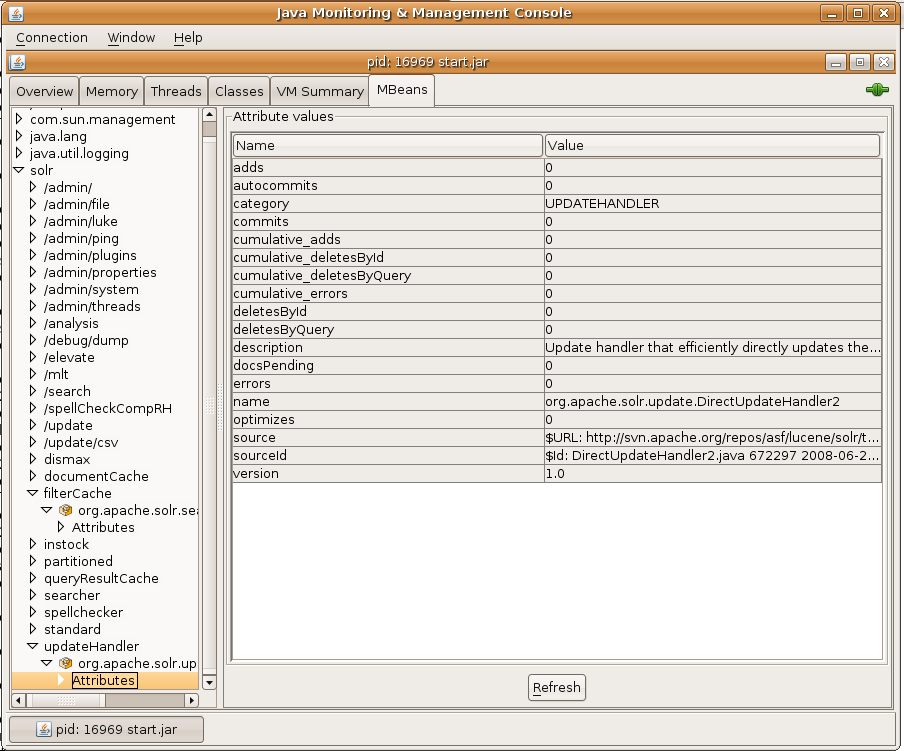
Using the example jetty setup provided with Solr installation, we can quickly see what the JMX support looks like in jconsole.
- Run "ant example" to build the example war file
- Goto example folder in the Solr installation and run the following command
java -Dcom.sun.management.jmxremote -jar start.jar
- Start jconsole (provided with the Sun JDK in the bin directory)
- Connect to the "start.jar" shown in the list of local processes
- Switch to the "MBeans" tab and you should be able to see "solr" listed there.
Remote Connection to Solr JMX
If you want to connect to Solr remotely, you need to pass in some extra parameters, documented here:
-Dcom.sun.management.jmxremote.port=3000
-Dcom.sun.management.jmxremote.ssl=false
-Dcom.sun.management.jmxremote.authenticate=false
If you are not able to connect from a remote machine, take into account that you may also need to specify the hostname of the solr host by adding the following property as well:
-Djava.rmi.server.hostname=IP_OR_HOSTNAME
NB: making JMX connections into machines running behind NATs (e.g. Amazon's EC2 service) is not a simple task. The java.rmi.server.hostname system property may help, but running JConsole on the server itself and using a remote desktop is often the simplest solution. See Monitoring Java applications running on EC2 instances using JMX.
Where to find it
Support for JMX was built at SOLR-256 Stats via JMX
Please help us by giving your feedback, comments and suggestions.