<!> Solr1.4
This document describes the Java implementation of index replication that works over HTTP and was introduced in Solr1.4. For information on the ssh/rsync based replication available since Solr1.1 please consult CollectionDistribution. Note that for SolrCloud in Solr4.0, replication will be done push-style, and this way of replicating the index will not be necessary anymore.
Features
- Replication without requiring external scripts
- Configuration in solrconfig.xml only
- Replicates configuration files also
- Works across platforms with same configuration
- No reliance on OS-dependent hard links
- Tightly integrated with Solr; an admin page offers fine-grained control of each aspect of replication
SOLR-561 tracks the original development of this feature.
Configuration
The new Java-based replication feature is implemented as a RequestHandler. Configuring replication is therefore similar to any normal RequestHandler.
Master
<requestHandler name="/replication" class="solr.ReplicationHandler" >
    <lst name="master">
        <!--Replicate on 'startup' and 'commit'. 'optimize' is also a valid value for replicateAfter. -->
        <str name="replicateAfter">startup</str>
        <str name="replicateAfter">commit</str>

        <!--Create a backup after 'optimize'. Other values can be 'commit', 'startup'. It is possible to have multiple entries of this config string.  Note that this is just for backup, replication does not require this. -->
        <!-- <str name="backupAfter">optimize</str> -->

        <!--If configuration files need to be replicated give the names here, separated by comma -->
        <str name="confFiles">schema.xml,stopwords.txt,elevate.xml</str>
        <!--The default value of reservation is 10 secs.See the documentation below . Normally , you should not need to specify this -->
        <str name="commitReserveDuration">00:00:10</str>
    </lst>
    <!-- keep only 1 backup.  Using this parameter precludes using the "numberToKeep" request parameter. (Solr3.6 / Solr4.0)-->
    <!-- (For this to work in conjunction with "backupAfter" with Solr 3.6.0, see bug fix https://issues.apache.org/jira/browse/SOLR-3361 )-->
    <str name="maxNumberOfBackups">1</str>
</requestHandler>
Note:
- If your commits are very frequent and network is particularly slow, you can tweak an extra attribute
<str name="commitReserveDuration">00:00:10</str>. This is roughly the time taken to download 5MB from master to slave. Default is 10 secs. - If you are using startup option for replicateAfter, it is necessary to have a commit/optimize entry also, if you want to trigger replication on future commits/optimizes. If only the startup option is given, replication will not be triggered on subsequent commits/optimizes after it is done for the first time at the start.
Replicating solrconfig.xml
In solrconfig.xml on the master server, in the replication request handler, include a line like the following:
<str name="confFiles">solrconfig_slave.xml:solrconfig.xml,x.xml,y.xml</str>
This ensures that the local configuration 'solrconfig_slave.xml' will be saved as 'solrconfig.xml' on the slave. All other files will be saved with their original names. (Note that the "confFiles" value is set to something else in the example shown above.)
On the master server, the file name of the slave configuration file can be anything, as long as the name is correctly identified in the "confFiles" string; then it will be saved as whatever file name appears after the colon ':'.
Slave
<requestHandler name="/replication" class="solr.ReplicationHandler" >
    <lst name="slave">

        <!--fully qualified url to the master core. It is possible to pass on this as a request param for the fetchindex command-->
        <str name="masterUrl">http://master_host:port/solr/corename</str>

        <!--Interval in which the slave should poll master .Format is HH:mm:ss . If this is absent slave does not poll automatically.
         But a fetchindex can be triggered from the admin or the http API -->
        <str name="pollInterval">00:00:20</str>
        <!-- THE FOLLOWING PARAMETERS ARE USUALLY NOT REQUIRED-->
        <!--to use compression while transferring the index files. The possible values are internal|external
         if the value is 'external' make sure that your master Solr has the settings to honour the accept-encoding header.
         see here for details http://wiki.apache.org/solr/SolrHttpCompression
         If it is 'internal' everything will be taken care of automatically.
         USE THIS ONLY IF YOUR BANDWIDTH IS LOW . THIS CAN ACTUALLY SLOWDOWN REPLICATION IN A LAN-->
        <str name="compression">internal</str>
        <!--The following values are used when the slave connects to the master to download the index files.
         Default values implicitly set as 5000ms and 10000ms respectively. The user DOES NOT need to specify
         these unless the bandwidth is extremely low or if there is an extremely high latency-->
        <str name="httpConnTimeout">5000</str>
        <str name="httpReadTimeout">10000</str>

        <!-- If HTTP Basic authentication is enabled on the master, then the slave can be configured with the following -->
        <str name="httpBasicAuthUser">username</str>
        <str name="httpBasicAuthPassword">password</str>

     </lst>
</requestHandler>
Note: If you are not using cores, then you simply omit the "corename" parameter above in the masterUrl. To ensure that the url is correct, just hit the url with a browser. You must get a status OK response.
Setting up a Repeater
A master may be able to serve only so many slaves without affecting performance. Some organizations have deployed slave servers across multiple data centers. If each slave downloads the index from a remote data center, the resulting download may consume too much network bandwidth. To avoid performance degradation in cases like this, you can configure one or more slaves as repeaters. A repeater is simply a node that acts as both a master and a slave.
- To configure a server as a repeater, both the master and slave configuration lists need to be present inside the ReplicationHandler requestHandler in the solrconfig.xml file.
- Be sure to have replicateAfter 'commit' setup on repeater even if replicateAfter is set to optimize on the main master. This is because on a repeater (or any slave), only a commit is called after index is downloaded. Optimize is never called on slaves.
- Optionally, one can configure the repeater to fetch compressed files from the master through the 'compression' parameter (see 'slave' section for details) to reduce the index download time.
Example configuration of a repeater:
<requestHandler name="/replication" class="solr.ReplicationHandler">
    <lst name="master">
      <str name="replicateAfter">commit</str>
      <str name="confFiles">schema.xml,stopwords.txt,synonyms.txt</str>
    </lst>
    <lst name="slave">
      <str name="masterUrl">http://master.solr.company.com:8080/solr</str>
      <str name="pollInterval">00:00:60</str>
    </lst>
  </requestHandler>
enable/disable master/slave in a node
If a server needs to be turned into a master from a slave or if you wish to use the same solrconfig.xml for both master and slave, do as follows,
<requestHandler name="/replication" class="solr.ReplicationHandler" >
  <lst name="master">
    <str name="enable">${enable.master:false}</str>
    <str name="replicateAfter">commit</str>
    <str name="confFiles">schema.xml,stopwords.txt</str>
 </lst>
 <lst name="slave">
    <str name="enable">${enable.slave:false}</str>
   <str name="masterUrl">http://master_host:8983/solr</str>
   <str name="pollInterval">00:00:60</str>
 </lst>
</requestHandler>
NOTE: Be sure to add a 'false' default to enable.master and enable.slave, or deploying will fail and the log will shows Solr gets a '.' instead of correct core instance dir. In Solr Admin main page, you won't see links with core names (Clicking into the only link, you'll get 'missing core in path' error).
NOTE: If deploying is ok but you'll still see no links with core name, it could be permission problem. This normally happens when you set instance dir under AP server's default webapps folder. The workaround is to create another folder with good permissions, and put solr.xml into root of that folder. Edit context file to point solr/home to that folder. Now undeploy previous webapp and redeploy again.
When the master is started, pass in -Denable.master=true and in the slave pass in -Denable.slave=true. Alternately, these values can be stored in a solrcore.properties file as follows:
#solrcore.properties in master
enable.master=true
enable.slave=false
and in slave
#solrcore.properties in slave
enable.master=false
enable.slave=true
NOTE: Each core has its own solrcore.properties that is located under the conf directory of each core's instance directory.
Replication with MultiCore
Add the replication request handler to solrconfig.xml for each core (i.e. /usr/share/tomcat6/solr/CORENAME/conf/solrconfig.xml). You can use ${solr.core.name} to avoid hard coding the core name in your config.
Master configuration remains the same:
<requestHandler name="/replication" class="solr.ReplicationHandler" >
  <lst name="master">
    <str name="replicateAfter">commit</str>
    <str name="confFiles">schema.xml,mapping-ISOLatin1Accent.txt,protwords.txt,stopwords.txt,synonyms.txt,elevate.xml</str>
  </lst>
</requestHandler>
And slave just needs the core.name added.
<requestHandler name="/replication" class="solr.ReplicationHandler" >
  <lst name="slave">
    <str name="masterUrl">http://${MASTER_CORE_URL}/${solr.core.name}</str>
    <str name="pollInterval">${POLL_TIME}</str>
  </lst>
</requestHandler>
Variables (i.e. $POLL_TIME $MASTER_CORE_URL) can be defined in a solrcore.properties file for each core.
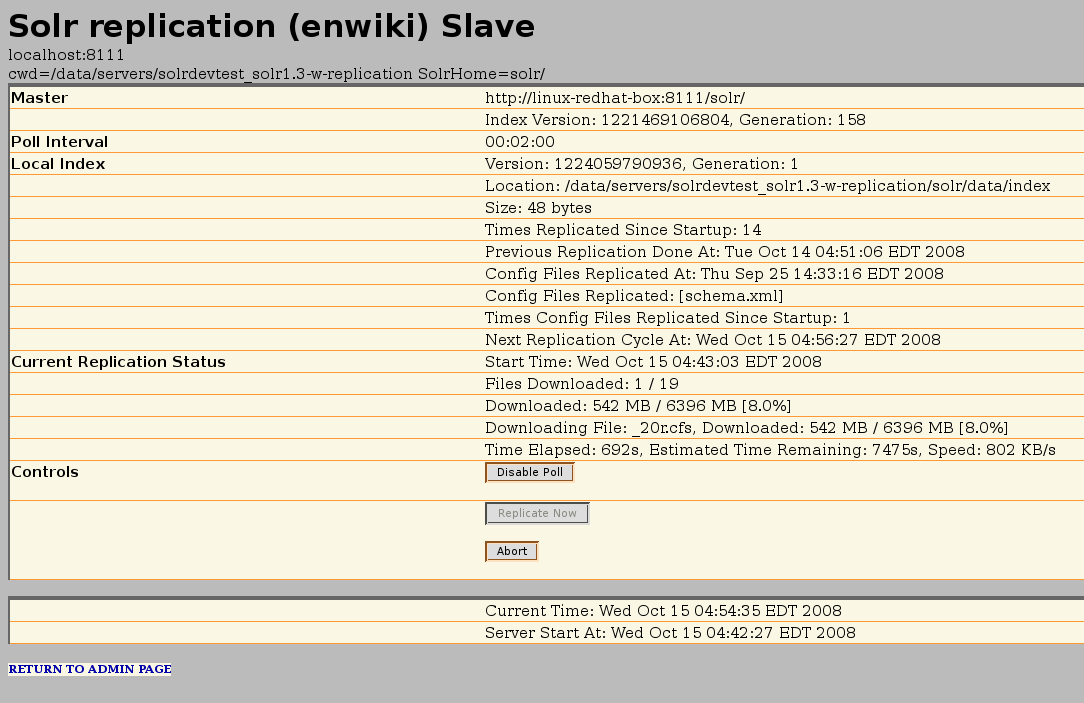
Replication Dashboard
This shows the following information
- status of current replication
- percentage/size downloaded/to be downloaded
- Current file being downloaded
- Time taken/Time remaining
The following actions can be performed from the dashboard
- Enable/Disable polling
- Force start replication
- Abort an ongoing replication
How does it work?
This feature relies on the IndexDeletionPolicy feature of Lucene. Through this API, Lucene exposes IndexCommits as callbacks for each commit/optimize. An IndexCommit exposes the files associated with each commit. This enables us to identify the files that need to be replicated.
True to the tradition of Solr, all operations are performed over a REST API. The ReplicationHandler exposes a REST API for all the operations it supports.
What happens when I commit or optimize?
When a commit/optimize is done on master, ReplicationHandler reads the list of file names which are associated with each commit point. This relies on the 'replicateAfter' parameter in the configuration to decide when these file names are to be fetched and stored from Lucene.
How does the slave replicate?
The master is totally unaware of the slaves. The slave continuously keeps polling the master (depending on the 'pollInterval' parameter) to check the current index version the master. If the slave finds out that the master has a newer version of the index it initiates a replication process. The steps are as follows,
- Slave issues a filelist command to get the list of the files. This command returns the names of the files as well as some metadata (size,lastmodified,alias if any)
- The slave checks with its own index if it has any of those files in the local index. It then proceeds to download the missing files (The command name is 'filecontent' ). This uses a custom format (akin to the HTTP chunked encoding) to download the full content or a part of each file. If the connection breaks in between , the download resumes from the point it failed. At any point, it tries 5 times before giving up a replication altogether.
- The files are downloaded into a temp dir. So if the slave or master crashes in between it does not corrupt anything. It just aborts the current replication.
- After the download completes, all the new files are 'mov'ed to the slave's live index directory and the files' timestamps will match the timestamps in the master.
- A 'commit' command is issued on the slave by the Slave's ReplicationHandler and the new index is loaded.
How are configuration files replicated?
- The files that are to be replicated have to be mentioned explicitly in using the 'confFiles' parameter.
- Only files in the 'conf' dir of the solr instance are replicated.
- The files are replicated only along with a fresh index. That means even if a file is changed in the master the file is replicated only after there is a new commit/optimize on the master.
- Unlike the index files, where the timestamp is good enough to figure out if they are identical, conf files are compared against their checksum. The schema.xml files (on master and slave) are same if their checksums match.
- Conf files are also downloaded to a temp dir before they are 'mov'ed to the original files. The old files are renamed and kept in the same directory. ReplicationHandler does not automatically clean up these old files.
- If a replication involved downloading of at least one conf file a core reload is issued instead of a 'commit' command.
What if I add documents to the slave or if slave index gets corrupted?
If docs are added to the slave, then the slave is not in sync with the master anymore. But, it does not do anything to keep it in sync with master until the master has a newer index. When a commit happens on the master, the index version of the master will become different from that of the slave. The slave fetches the list of files and finds that some of the files (same name) are there in the local index with a different size/timestamp. This means that the master and slave have incompatible indexes. Slave then copies all the files from master (there may be scope to optimize this, but this is a rare case and may not be worth it) to a new index dir and and asks the core to load the fresh index from the new directory.
HTTP API
These commands can be invoked over HTTP to the ReplicationHandler
- Get the latest replicateable index on master: http://master_host:port/solr/replication?command=indexversion
- Abort copying index from master to slave command: http://slave_host:port/solr/replication?command=abortfetch
- Create a backup on master if there are committed index data in the server, otherwise do nothing. This is useful to take periodic backups. Command: http://master_host:port/solr/replication?command=backup.
- Can also provide a location parameter (i.e. &location=/foo/bar), which is the directory to write the backup to on disk.
- Specify parameter "numberToKeep" to indicate how many backups to retain (including this one). Older backups will be automatically deleted. (i.e. &numberToKeep=2) Solr3.5 Solr4.0
(note: this parameter cannot be specified if "maxNumberOfBackups" was specified in the configuration. Solr3.6 Solr4.0 ) - Force a fetchindex on slave from master command: http://slave_host:port/solr/replication?command=fetchindex
- It is possible to pass on extra attribute 'masterUrl' or other attributes like 'compression' (or any other parameter which is specified in the
<lst name="slave">tag) to do a one time replication from a master. This obviates the need for hardcoding the master in the slave. - Disable polling for changes from slave command: http://slave_host:port/solr/replication?command=disablepoll
- Enable polling for changes from slave command: http://slave_host:port/solr/replication?command=enablepoll
- Get all the details of the configuration and current status: http://slave_host:port/solr/replication?command=details
- Get version number of the index: http://host:port/solr/replication?command=indexversion
- Get list of lucene files present in the index: http://host:port/solr/replication?command=filelist&indexversion=<index-version-number> . The version number can be obtained using the indexversion command
- Disable replication on master for all slaves: http://master_host:port/solr/replication?command=disablereplication
- Enable replication on master for all slaves: http://master_host:port/solr/replication?command=enablereplication
- Transfer a file from the master: http://master_host:port/solr/replication?command=filecontent&wt=filestream&indexversion=<index-version-number>
- index files use an additional parameter
file=<index-filename>, configuration files use an additional parametercf=<config-filename>instead. - file contents are transferred in a custom stream format.
- index files use an additional parameter
Troubleshooting
Not replicating. Admin show index version but /replication?command=indexversion returns 0
Try configuring replicateAfter on startup.
<requestHandler name="/replication" class="solr.ReplicationHandler" >
  <lst name="master">
    <str name="replicateAfter">commit</str>
    <str name="replicateAfter">startup</str>
    <str name="replicateAfter">optimize</str>
    <str name="confFiles">schema.xml,mapping-ISOLatin1Accent.txt,protwords.txt,stopwords.txt,synonyms.txt,elevate.xml</str>
  </lst>
</requestHandler>
Admin Page for Replication
Performance numbers
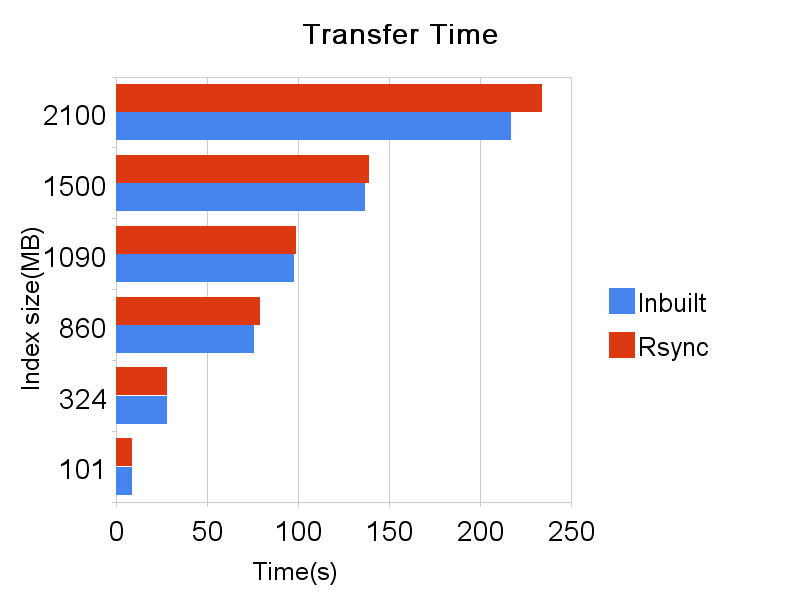
The Chart
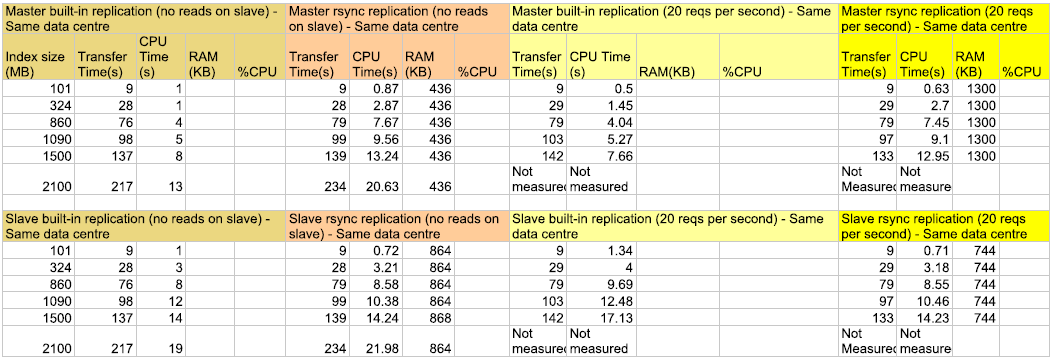
Data